In practice, problems begin not with the “set up exchange” button, but with undescribed rules. Where is the main catalog: on the website or in 1C? What prices should I show the client? How often do you update stock levels? What should I do if my order changes after placing it? What statuses should be returned to the buyer?
In this article, we will look at what data is usually synchronized between 1C-Bitrix and 1C, where errors most often appear, and what needs to be prepared before the integration starts.
Why does an online store need integration with 1C
Without integration, the site and the accounting system live separately. Products are changed in 1C, prices are updated in tables, stock levels are checked manually, and the manager transfers orders from the website to 1C himself. As long as there are few orders, this is tolerable. As sales grow, the manual process quickly creates errors.
Integration helps solve several problems:
- automatically upload goods from 1C to the website;
- transfer prices and discounts without manual editing;
- show current warehouse stock levels;
- download orders from the website into 1C;
- update order statuses for the client and manager;
- reduce the number of duplicates, errors and manual operations.
It is important to understand: integration does not correct the chaos in the data. If in 1C there are duplicate nomenclatures, there are no common articles, characteristics are filled out incorrectly or statuses are not described, the site will receive the same chaos, only in a public form.
What data is synchronized
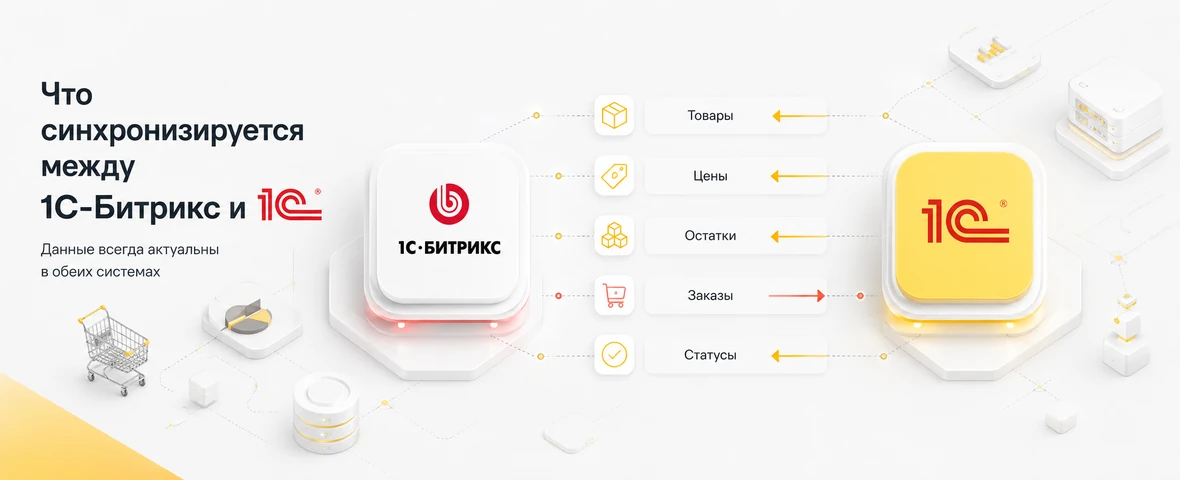
Most often, the exchange is built around five groups of data: products, prices, stock levels, orders and statuses. Sometimes images, characteristics, price types, contractors, documents, discounts and warehouse data are additionally transmitted.
| Data | Usually come from | Usually go to | What is important to check |
|---|---|---|---|
| Products | 1C | 1C-Bitrix | Articles, names, categories, characteristics, sales offers |
| Prices | 1C | 1C-Bitrix | Price types, discounts, currencies, wholesale and retail rules |
| Stock levels | 1C | 1C-Bitrix | Warehouses, reserve, available quantity, update frequency |
| Orders | 1C-Bitrix | 1C | Order contents, client, delivery, payment, comments |
| Statuses | 1C | 1C-Bitrix | Paid, assembled, shipped, canceled, delivered |
It cannot be assumed that the standard exchange itself will solve all scenarios. Each business has its own rules: multiple warehouses, different types of prices, B2B clients, individual discounts, reserves, partial shipments or purchase orders.
Products: product catalog, categories and product variants
The first layer of integration is products. From 1C, names, articles, descriptions, images, properties, categories and product variants can be uploaded to the site. But the 1C catalog is not always ready for an online store.
A common mistake is to unload internal items as is. In 1C, a product may have a name that is convenient for the warehouse or accountant, but is unclear to the buyer. Therefore, before the exchange, you need to decide which fields remain technical and which are used on the site.
Particular attention should be paid to:
- uniform articles and external identifiers;
- category structure for the catalogue;
- characteristics that will become filters;
- product options: size, color, equipment, volume;
- images and descriptions;
- connections between the product and product variants.
If IDs change, products may be duplicated. If the properties are filled chaotically, the filters will become useless. If the categories in 1C coincide only with internal accounting, it will be difficult for the buyer to choose a product.
Prices and stock levels: where the logic most often breaks down
Prices and stock levels are the most sensitive part of the exchange. An error here has an immediate impact on sales: the customer sees the wrong price, orders an item that is not available, or cannot purchase an item that is actually in stock.
Before integration, you need to determine what prices should appear on the site. For example, only retail, several types of prices, personal prices for B2B clients, or prices including promotions. For stock levels, it is important to decide whether to show the total quantity, availability by warehouse, or only the “in stock” status.
| Script | What to configure | Risk without configuration |
|---|---|---|
| Several price types | Display rules for retail, wholesale and B2B | The client will not see his own price |
| Several warehouses | Warehouse priority and available quantity | The site will show goods that cannot be shipped |
| Reservation | When an item is written off or reserved | Sales will appear in excess of the balance |
| Promotions and discounts | Rule source and validity period | The price on the website will differ from the accounting system |
| Rare update | Communication frequency and critical data | Remainings will expire between exchanges |
If the store operates with active sales, stock levels cannot be updated once a day. The frequency of exchange must correspond to the actual turnover of goods and the risk of selling an unavailable product.
Orders: what should leave the site in 1C
When a buyer places an order, the site must transfer not only a list of products to 1C. For normal processing, we need customer data, order contents, prices, discounts, delivery method, payment method, comments, contact information and service information.
Before development, you need to describe:
- which order fields are required;
- where client comments go;
- how promotional codes and discounts are transmitted;
- what to do with changes in the composition of the order;
- how to handle cancellation;
- how to link an order to a client or counterparty;
- who is responsible for manual verification of disputed orders.
In B2B projects, an order can be not a simple purchase, but a request for an invoice, a repeat order, an order from a legal entity, or approval from a manager. These scenarios need to be laid out in advance, otherwise the integration will only work for simple retail orders.
Statuses: how the client understands what is happening with the order
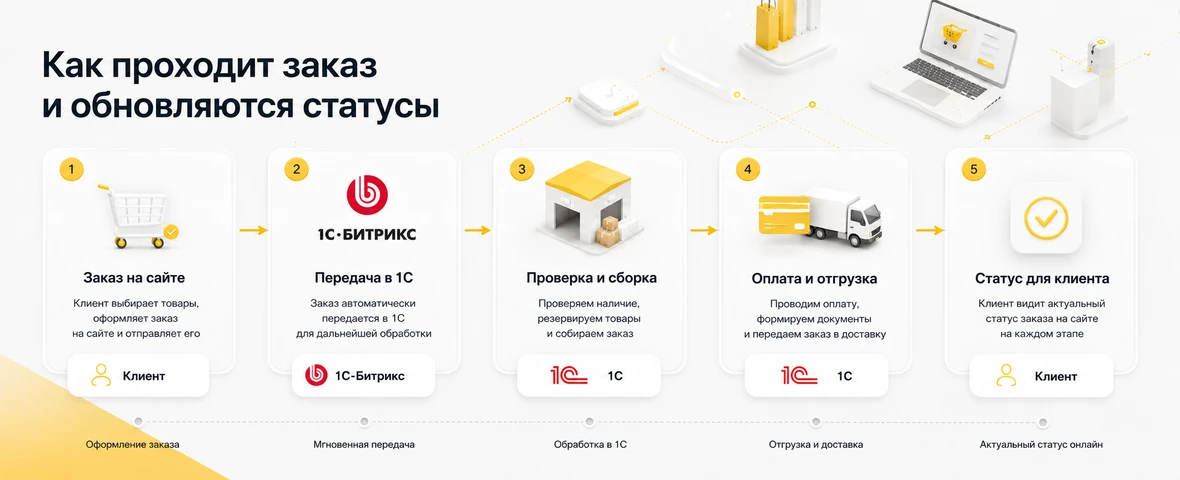
Statuses are often underestimated. Businesses think about transferring goods and orders, but forget that the client and manager need to see a clear process: the order has been accepted, paid, assembled, sent for delivery, delivered or cancelled.
If the statuses are not synchronized, the buyer starts writing to the manager, and the manager checks everything manually. As a result, CRM, website and 1C show different states of one order.
A good status scheme should be simple. There is no need to transfer all internal states from 1C to the site. The buyer only needs clear steps, and the manager needs sufficient detail to process the order.
Typical errors during integration
Most problems arise not because of the exchange technology itself, but because of poor preparation of data and scripts.
| Error | What does it lead to? | How to avoid |
|---|---|---|
| No single data source | Products and prices differ between the site and 1C | Define in advance which system is master for each data type |
| Product IDs are changing | Duplicates and broken connections appear | Fix external IDs and update rules |
| Statuses not described | The client and manager see different order states | Agree on the status map before development |
| No error handling | Exchange breaks down unnoticeably | Configure logs, notifications and checking procedures |
| Exchange too infrequent | The site shows outdated prices and stock levels | Select exchange frequency according to data criticality |
Integration should not be designed as a one-time setup, but as a workflow. It has a data source, exchange schedule, error rules, responsible employees and a clear support script.
What issues need to be agreed upon with the business
Before technical setup of the exchange, management rules must be agreed upon. The developer can enable data transfer, but he should not decide for himself what the main price is, when the product is reserved and what statuses the client sees. These decisions relate to a business process.
At the start, it is worth recording who is responsible for the item, who updates the prices, how the manager works with the changed order, whether it is possible to edit the order after transfer to 1C, what to do with cancellation, how to process returns and who checks the exchange log. Such preparation saves time on launch and reduces the risk of conflicts between the website, accounting system and sales department.
What to prepare before the start
Before integrating 1C-Bitrix and 1C, you need to collect not only access credentials, but also a description of the business logic.
- what 1C configuration is used;
- what products and sections need to be unloaded;
- which product fields are required for the site;
- what types of prices are needed;
- how to take into account stock levels and reserves;
- which warehouses are involved in the exchange;
- which order fields should go to 1C;
- what statuses need to be returned to the site;
- who is responsible for exchange errors;
- how to check correctness after startup.
The more accurately the rules are described, the fewer change requests will appear after launch. The technical setup of the exchange is important, but without clear business logic it will not give a stable result.
When standard exchange is not enough
Standard exchange is not suitable for all projects. The more non-standard rules there are in a store, the higher the likelihood that the synchronization logic will need to be modified. This is normal: the task of integration is not just to transfer data, but to integrate the exchange into the real processes of the company.
Additional settings are often needed if:
- several warehouses with different shipping rules;
- wholesale and retail prices for different groups of clients;
- personal discounts or contractual conditions;
- B2B orders from legal entities;
- partial shipments and reserves;
- complex status map between the site, 1C and CRM;
- need to control exchange errors and retries.
In such cases, integration must be designed as a separate layer of architecture: with data rules, an exchange log, responsible and understandable failure recovery scenarios.
How to test integration after launch
After setting up the exchange, you need to check not only the successful scenario, but also borderline situations. The test order must go all the way: registration on the website, transfer to 1C, change of status, update of stock levels and return of understandable information to the client or manager.
It is also worth checking for price changes, lack of goods in stock, order cancellation, repeated product import, customer duplicate, transfer error and exchange restoration after temporary unavailability of one of the systems. It is these scenarios that most often show how ready the integration is for the real load.
How to understand that the integration is designed correctly
Correct integration does not require constant manual monitoring. The manager does not have to check each order with the table, correct stock levels after each sale, or look for why the price on the website differs from the price in 1C. The system should show what data was updated, what operations completed successfully, and where an error occurred.
A good sign is a clear area of responsibility. 1C is responsible for accounting, the website is responsible for placing an order and the client interface, CRM is responsible for the work of managers, and the exchange log shows the synchronization status. If, when a failure occurs, it is clear where to look for the cause and who should fix it, the integration will be supported after launch.
Output
Integration of 1C-Bitrix and 1C should link the site and accounting system into one workflow. The main goal is not just to transfer files or enable exchange, but to provide current products, prices, stock levels, orders and statuses.
Good integration begins with an audit of data: items, prices, warehouses, statuses, orders and error handling rules. Only after this should you move on to setting up the exchange and making improvements.
DevAstro designs and configures integrations for online stores: connects 1C-Bitrix with 1C, CRM, Bitrix24, MoySklad, payment, delivery and analytics.
If an online store needs stable synchronization of products, prices, stock levels, orders and statuses, look at the direction of API integrations and the online store development service.
FAQ
What should be defined before integrating 1C-Bitrix with 1C?
Define which system owns products, variants, prices, stock, customers, orders and statuses. Then document identifiers, exchange direction, frequency, validation, retries and the people responsible for incidents on both sides.
How do you prevent duplicate orders during retries?
Use an immutable external order ID and idempotent import logic. Repeating the same successful request must return or update the existing order rather than creating another order or payment.
Should marketing content be exported from 1C?
Usually accounting data and marketing content should have different owners. 1C can own identity, stock and base prices, while the website or PIM owns SEO copy, media and landing-page content so an exchange cannot overwrite it.
What happens if 1C is temporarily unavailable?
The integration should queue safe operations, retry temporary failures and alert an owner after an agreed threshold. The storefront also needs a policy for stale prices or stock instead of silently showing data indefinitely.
Can the 1C exchange be launched in stages?
Yes. Start with product identity, then validate prices and stock, and only then add orders and statuses. Each stage should pass reconciliation and failure tests before the next flow is enabled.
What determines integration cost?
Cost depends on catalog quality, number of price and warehouse rules, order logic, exchange method, error handling, testing and support requirements. A short data-flow specification is more useful for estimating than a module list.