
A website audit is needed not for a report of dozens of pages, but for a management decision: is it possible to already invest in improvements, SEO or advertising, or do you first need to eliminate technical and conversion limitations. If a project is losing requests, is poorly indexed, loads slowly, or does not transfer data correctly to the CRM, new investments can only exacerbate the problem.
Before launching advertising, it is important to understand whether enquiries reach managers and whether goals are recorded. Before SEO - are important pages open for indexing, are there any duplicates, 404 and technical restrictions. Before development changes - how ready the site is for changes, are there backup copies, clear architecture, access, documentation and staging environment.
Why verification is needed before investments, and not after problems
A common mistake is to start with action: launch advertising, order SEO, add a new section, redo the main page or connect CRM. But if the current state of the site is not verified, the business does not understand where exactly the results are being lost. The problem may not be traffic, but the form, mobile version, speed, analytics or data transfer.
Preliminary diagnostics helps determine the order of work. Sometimes there is no urgent need to redo the entire site: it is enough to fix forms, goals, redirects, mobile errors and landing page speed. In other cases, an audit reveals that spot edits are no longer effective because technical debt has accumulated.
The value of diagnostics is in prioritization. It answers the questions: what is hindering enquiries now, what is dangerous for SEO, what will distort advertising analytics, what may break during development changes, and what corrections will have the greatest effect.
What a business risks losing without verification
Without preliminary diagnostics, the company risks spending its budget on promoting a project that is not ready to receive traffic. Ad campaigns may lead to slow pages, forms may not submit, goals may not fire, and CRM may receive incomplete data without the source of the hit.
In SEO, the risk is different: the work begins with content and links, but the technical base interferes with indexing. Pages may be closed in robots.txt, have incorrect canonicals, be duplicated, return 404, load too slowly, or compete with each other due to a weak structure.
When development changes are made without prior control, already working scripts can be damaged. The new form breaks the old integration, updating the module conflicts with custom logic, changing the template removes important SEO blocks, and the new button is not included in the analytics. Such errors are often discovered after launch, when some enquiries and data are lost.
Audit before website modification
Before making technical changes, you need to understand on what basis you will have to work. The CMS, templates, modules, customizations, component versions, database structure, access credentials, backups, documentation, dependencies and history of previous edits are checked.
If a project has been developing for a long time without regulations, even a small task can lead to unexpected consequences: part of the logic is in templates, part in modules, part in third-party scripts or manual edits.
You also need to define a staging environment. Edits on a working website without checking are dangerous: you can break the form, cart, customer portal, filter, payment, integration with CRM, or sending events to analytics.
SEO audit before promotion
SEO audit before promotion should begin with the technical accessibility of the pages. You need to check which URLs are open for indexing, which are closed, where there are 404s, which pages are included in the sitemap.xml, how redirects work and whether there are duplicates that blur the relevance.
Next, Title, Description, H1, H2 structure, CNC, canonical, internal linking, breadcrumbs, category pages, product cards, landing pages and commercial blocks are checked. For an online store, filters, sorting, brand pages, product properties and indexed combinations are looked at separately.
SEO cannot be considered separately from speed and mobile version. If the page loads slowly, the content jumps when rendered, the buttons are inconvenient on the phone, and the enquiry form is hidden below heavy blocks, the technical basis for promotion is weaker, even if the meta tags are filled out correctly.
Audit before advertising launch
Before advertising, the site must be checked as a conversion system. The landing page should open quickly, clearly explain the offer, contain a working form, record the source of the referral, send data to CRM and correctly transfer the event to analytics.
It is important to go through the user path from the ad to the application. The first screen, offer, CTA, form, buttons, phone, messengers, thank-you page, UTM tags, events, calls and notifications are checked. If advertising traffic goes to a page without goals and CRM control, the business will not see the real cost per enquiry.
For an online store, the product card, filter, basket, payment, delivery, statuses, e-commerce events and order transfer to managers are additionally checked.
Forms, enquiries and CRM: where results are most often lost
The form may appear to work, but may not complete the task. The user clicks a button, sees a message about sending, but the enquiry does not reach CRM, does not go to email, does not contain a UTM tag, or is not assigned to the responsible manager.
You need to check not only the sending, but also the quality of the data. The enquiry must contain the source, request page, selected service or product, contacts, comment, city, advertising tags and other fields that are needed by the sales department. If the CRM only receives a name and phone number, marketing and managers lose context.
Duplicates, antispam, phone mask, required fields, validation errors, notifications, letters to the client, statuses and resending in case of failure are checked separately. If the site is connected to several channels - forms, quizzes, instant messengers, calls and shopping cart - each scenario needs to be tested separately.
Analytics: can you trust site data
Before SEO, advertising or development changes, you need to understand how reliable the data is. Counters may be installed on the site, but this does not mean that analytics correctly records goals, events, forms, clicks, calls, orders, sources and statuses in CRM.
Problems are often found in the details: one form sends an event, another does not; mobile call button is not tracked; The thank-you page does not always open; UTM tags are lost when moving between pages; CRM receives the request, but analytics does not associate it with the source.
Diagnostics must verify data between the advertising account, analytics, CRM and actual requests. If the numbers don’t add up, the business won’t be able to understand which channel is working, which page is generating enquiries, and which improvements really impacted the results.
Speed and mobile version
Speed influences user behavior and return on investment. A slow page can reduce conversions before the user even reads the offer. This is especially noticeable in mobile traffic, where unstable connections, heavy images and unnecessary scripts quickly create failures.
You need to check images, fonts, third-party widgets, advertising pixels, heavy libraries, server latency, caching and first screen behavior. Core Web Vitals are assessed separately: core content loading, interactivity, and visual stability.
The mobile version is checked not by a screenshot, but by a script. The user must open a menu, find a service, read key arguments, click a button, fill out a form, select a product, go through a shopping cart, or call. If it's inconvenient on the phone, advertising and SEO traffic will work worse.
Content, structure and commercial pages
Site verification should evaluate not only technical errors. Sales pages may be accessible, fast and indexable, but they are poor at explaining the offer. Then the problem is not traffic, but structure and content.
Service pages, categories, product cards, cases, prices or working conditions, trust blocks, CTAs, forms, examples of work, advantages, objections and internal navigation are checked. The user must quickly understand what the company offers, who it is suitable for, how the work is structured and what to do next.
For SEO, the structure must match the demand. For advertising - an ad. For improvements - show which blocks to save, improve or rebuild.
Integrations and external services
If the site is connected to CRM, 1C, warehouse, payment, delivery, telephony, mailings or external APIs, diagnostics should include checking data exchange. It's important to understand what data goes out, what data comes back, where errors are stored, and who is responsible for handling failures.
Application fields, order statuses, products, prices, stock levels, payments, notifications, logging, resending, exchange delays and data consistency between systems are checked. If the integration is unstable, the site may look normal, but the business will lose enquiries, orders, or accounting accuracy.
It is especially important to check integrations before development changes and advertising. A new form, a new cart, or changing fields can break the data transfer script. And advertising traffic will exacerbate the problem if enquiries are already arriving with errors.
Security, access and backups
Before any work, you need to check access, roles, active accounts, CMS, modules, SSL, forms, backups and recovery capabilities. Old contractor accounts, shared passwords, outdated extensions and unverified backups increase the risk of disasters.
Security is important not only for large portals. An ordinary corporate website can also suffer from spam, malicious inserts, data leakage from forms, mail disruption, or loss of access to the admin panel. For an online store, the risks are higher because there are orders, customers, payments and integrations.
The backup copy should not be abstract, but verifiable. You need to understand whether there is a copy of the files and database, how often it is created, where it is stored, who has access, and whether the site can be restored in a reasonable time.
What to check before reworking, SEO or advertising
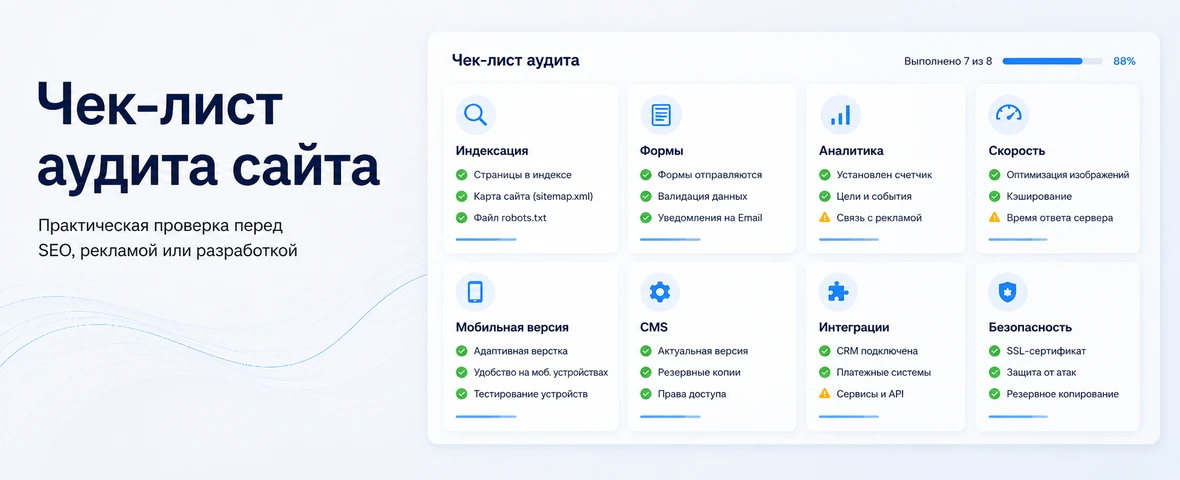
Below is the basic table. It does not replace detailed diagnostics, but it helps to divide checks according to business sense: what affects SEO, what affects enquiries, what affects the advertising budget, and what affects security and stability.
| Test area | What to check | Why does business need this? | Before what is especially important |
|---|---|---|---|
| Indexation | robots.txt, sitemap.xml, 404, canonical, page accessibility | So that SEO does not start with technical limitations | SEO |
| Forms and enquiries | Sending, CRM, mail, UTM, notifications | In order not to lose requests | Advertising, improvements |
| Analytics | Goals, events, calls, orders, e-commerce scenarios | To see the real result | Advertising, SEO |
| Speed | Core Web Vitals, images, scripts, server | In order not to lose users and conversions | SEO, advertising |
| Mobile version | Menu, buttons, forms, cards, checkout | For mobile traffic to pass through the script | Advertising, SEO |
| CMS and code | Modules, templates, dependencies, technical debt | So that improvements do not break the site | Improvements |
| Integrations | CRM, 1C, payment, delivery, API, logs | So that data is not lost between systems | Improvements, advertising |
| Security | Accesses, SSL, updates, backups, roles | To reduce the risk of accidents and leaks | Improvements |
Errors during site audit
The first mistake is to check only SEO and not look at enquiries. A site may be indexed, but not generate any enquiries due to forms, mobile problems, weak offers, or incorrect CRM integration.
The second mistake is to look only at the design. Visually, the site may look outdated, but the main losses occur in analytics, speed, redirects, CMS, events and data transfer.
The third mistake is to launch advertising without goals and CRM verification. Then the budget is spent, but the business does not see the real cost per enquiry, does not understand which campaigns are generating enquiries, and cannot link the sale to the source.
The fourth mistake is making diagnostics without an action plan. A problem list is only useful if each task has a priority, a risk, an expected impact, and a clear next step.
How DevAstro conducts a site audit before work
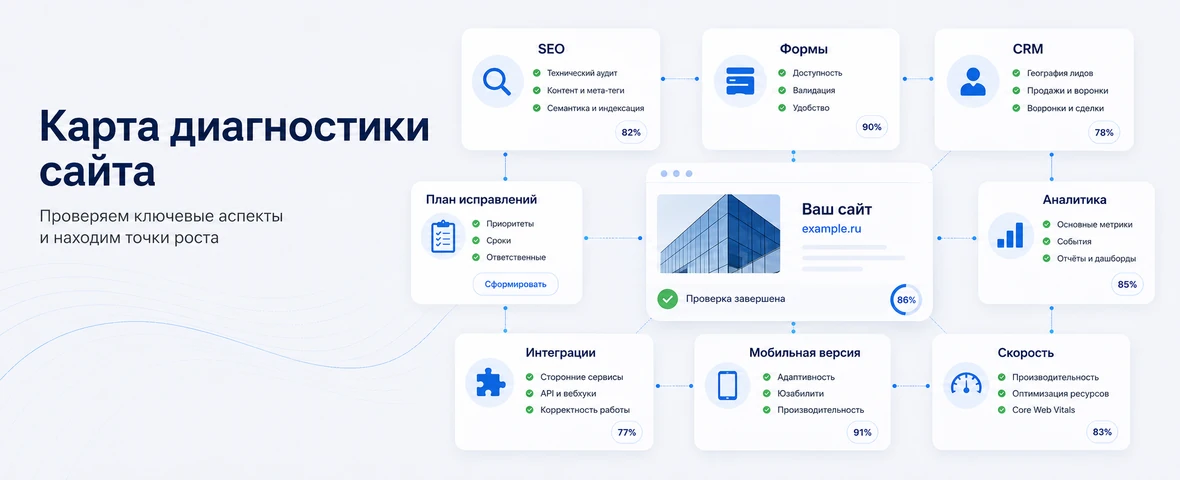
DevAstro views a site audit as preparation for practical solutions. If a project needs improvements, SEO, advertising or development, it is first important to understand what is already hindering the result: technical errors, weak forms, inaccurate analytics, unstable integrations, slow loading or CMS limitations.
As part of technical support for the site, the team checks the stability, forms, speed, errors, access, backups and readiness of the project for changes. If new sections, structure rework or interface development are needed, website development is involved. API integrations are assessed separately for CRM, 1C, payment, delivery and external services.
For online stores, the audit includes a catalog, cards, filters, cart, checkout, payment, delivery, e-commerce events and data exchange. Such tasks are related to the development of online stores and further support of the project after corrections.
What's the result?
A site audit is needed not for a formal report, but to understand where the project is losing money, enquiries, traffic and data. Before SEO, you need to check the technical basis and structure. Before advertising - forms, analytics, landing pages and CRM. Before improvements - architecture, access, backups, dependencies and integrations.
If you start investing without checking, you can increase not sales, but errors: drive traffic to a weak page, promote closed or duplicate URLs, improve an unstable CMS, measure results using incomplete data.
Correct diagnosis helps set priorities: what to fix urgently, what to plan, what does not affect the result and what work should be done first. This reduces the risk of chaotic edits and makes site development manageable.
FAQ
When should a website be audited before SEO or advertising?
An audit is needed before traffic investment when leads are dropping, pages index poorly, forms are unreliable, the website is slow or CRM receives incomplete data. The audit shows whether the project is ready for growth or needs technical and conversion fixes first.
What should be checked first?
Start with the areas where business results are lost: indexation, robots.txt, sitemap.xml, canonical tags, performance, mobile UX, forms, analytics goals, UTM tags, CRM lead transfer, backups and integration errors.
What makes an audit useful for business?
A useful audit does not only list problems. It prioritizes what blocks leads now, what is risky for SEO, what distorts ad analytics and which fixes should be included in the first implementation stage.
Can the website be improved without a full rebuild?
Often yes. Forms, goals, redirects, mobile issues, speed and key page structure may be enough. A rebuild is needed when the current CMS, code or architecture blocks growth and creates recurring risks.
How long does a website audit take?
A small website may take several working days, while ecommerce or an integrated service needs more time for templates, data, forms, analytics and exchanges. Scope should follow business risk, not a fixed page count.
What makes an audit recommendation actionable?
It should include evidence, business impact, priority, an owner and a way to verify the fix. A long error list without delivery order is not a management tool.