Launching a website does not mean that the project is completed. After release, the site begins to work in a real environment: it receives traffic from search and advertising, accepts enquiries, transfers orders to CRM, updates the catalog, exchanges data with 1C, collects analytics and encounters user errors. At this moment it becomes clear how ready the technical base is for operation.
Technical support for a website is needed not only to fix bugs. It protects commercial scenarios: the form must submit an enquiry, the order must enter the accounting system, the catalog must show current prices and stock levels, analytics must record goals, and search robots must see the correct pages. If these tasks are put off, problems accumulate and become more expensive.
Why launching a website is not the end of the project
Before release, the site is tested under controlled conditions: test users, a limited number of scripts, pre-prepared content and clear tasks for the team. After launch, real visitors, different devices, unstable Internet, advertising traffic, new pages, urgent edits and unpredictable user behavior appear.
It is after launch that errors appear that are not always visible at the development stage. The form may work in the test, but lose enquiries after connecting CRM. A catalog can open quickly with a small number of products, but slow down after full catalog import. Analytics can count views, but not record enquiries.
Post-launch support is needed so that the site does not turn into a collection of random edits. The project should have regulations: what is checked regularly, what errors are considered critical, who is responsible for corrections, how updates are tested, and what happens if the site stops accepting enquiries or orders.
Forms, enquiries and orders: the first thing that cannot be left uncontrolled
The form on the website may look good, but this does not mean that the business is receiving the request. The application must go through the entire chain: submission on the website, protection against spam, notification to the manager, recording in CRM, recording the goal in analytics, correct transmission of UTM tags and saving data for further processing.
After each change to forms, CRM, email notifications, anti-spam protection, order fields or cart scripts, you need to perform a control sending. For an online store, this applies not only to the feedback form, but also to placing an order, payment, delivery, promotional codes and statuses.
Updates of CMS, modules and components
CMS, modules, plugins and components need to be updated, but updates cannot be done blindly. Any change may affect templates, forms, catalog, integrations, administrative panel, payment, delivery or customer portal. If the site is already accepting clients, the update becomes an operational task rather than a technical formality.
Two extremes are dangerous. The first is to not update anything for months until vulnerabilities and incompatibilities appear. The second is to update everything at once without backup and testing. Regular maintenance must find a balance: update what is important, check the consequences, and not break working scripts.
Site security and vulnerabilities
Security cannot be left “for later,” especially if the site accepts enquiries, stores customer data, works with personal accounts, orders, payments or documents. Risk does not only arise from sophisticated attacks. Often the problem starts with an outdated module, weak passwords, unnecessary access rights, open technical pages or unsecured forms.
Site support should include vulnerability management: identifying problems, assessing risk, remediation, verifying the result, and documenting changes. This is especially important for projects where the site is connected to CRM, 1C, warehouse, payment services or user accounts.
Backups: why “they are somewhere” is not enough
A backup copy is useful only when it is clear what exactly is being copied, how often, where it is stored and whether the site can be restored from it. The phrase “backups are configured” does not reduce the risk if only part of the files are copied, the database is not included in the archive, access to the storage is lost, or recovery has never been checked.
A good support policy should answer four questions: what is being copied, how often the copy is created, where it is stored and who is responsible for recovery. Without these answers, backup remains a formality rather than a business protection tool.
Loading speed and stability
After launch, the site may gradually slow down. The reasons are different: they added new banners, loaded heavy images, connected a widget, expanded the catalog, added advertising tags, changed the template, increased the number of products, updated the integration, or launched a promotion due to increased traffic.
Speed affects more than just the technical report. The user may not wait for the service page, open the product card, apply a filter, complete the order, or submit the form. In SEO, speed and stability refer to the quality of the user experience, but they cannot be taken as a guarantee of ranking growth.

SEO after launch: what breaks unnoticed
SEO problems after launch are often not immediately visible to the user. A page may open normally, but be blocked from indexing. A section may end up in sitemap.xml, but give an error. The old URL may lead to a 404 instead of a proper redirect. Catalog filters can create duplicates, and test pages can be bypassed by search robots.
Technical support helps not to lose the SEO base: page accessibility, correct redirects, sitemap, absence of critical errors, stability of commercial URLs and normal operation of important scripts for search robots and users.
Integrations with CRM, 1C, warehouse and services
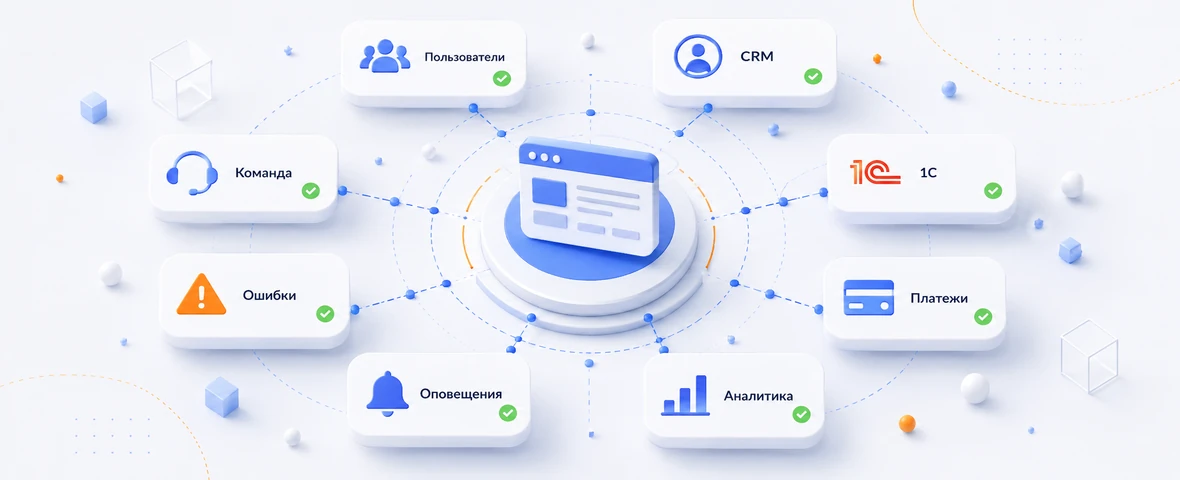
A modern website rarely works in isolation. Enquiries go to CRM, orders are transferred to 1C, stock levels arrive from the warehouse, payments are processed by the payment service, notifications are sent via mail, SMS or instant messengers. After launch, all these connections need to be controlled.
After any changes in CRM, 1C, warehouse, payment system, delivery, forms or catalog, you need to check the data exchange. It is important to go through the entire chain: the user performs an action on the site, the data goes to the external system, the status is returned, the manager sees the result, analytics records the event.
Catalog, prices, stock levels and product cards
For an online store, technical support for the site should include catalog control. An error in a catalog can be more costly than an error in a visual block: the user sees an item without a price, an outdated balance, an empty card, a broken filter, an incorrect discount, or the inability to add an item to the cart.
Catalog support should answer practical questions: can the product be found, does the filter work correctly, is the price current, does the balance match the accounting system, is there an image, does the card break after updating, does the order get processed.
Analytics and goals: why you can’t wait for a report at the end of the month
Analytics should work from the first day after launch. If goals are not set up, forms are not tracked, calls are not recorded, the cart does not transmit events, and CRM does not connect the request with the source, the business sees traffic, but does not understand what is happening with sales.
Waiting for a report at the end of the month is dangerous. If analytics breaks down at the beginning of an advertising campaign, a business may spend its budget and not see the real picture: which channels lead to requests, where users leave, which page does not convert, and what errors prevent the order from being placed.
Which support tasks cannot be postponed after launch
Site support should be linked to risks. Some tasks need to be checked after each change, others - according to a schedule, and others - when the load increases, advertising is launched, or business processes change. There is no universal schedule, but there are areas that cannot be left without the owner.
| Task | What to check | What happens if you postpone | How often to check |
|---|---|---|---|
| Forms and enquiries | Sending, CRM, mail, goals, notifications, UTM tags | Enquiries are lost, managers do not see requests, analytics distorts the picture | After each change and regularly |
| CMS updates | Versions, modules, compatibility, testing key scenarios | Risks of vulnerabilities, conflicts and component failures are growing | On schedule and after critical updates |
| Backups | Files, database, storage, access, recovery test | The site cannot be quickly returned after a failure or erroneous release | Regularly and after major changes |
| Security | Accesses, forms, roles, suspicious activity, vulnerable components | Possible hacking, spam, data leakage and loss of trust | Constantly or according to regulations |
| Speed | Commercial pages, Core Web Vitals, images, scripts, server | Rejections are increasing, user experience and the technical basis of SEO are deteriorating | After improvements, advertising launches and catalog growth |
| SEO technique | Robots.txt, sitemap.xml, redirects, 404, canonical, indexing | Search engines see errors or lose important pages | After releases and structural changes |
| Integrations | CRM, 1C, warehouse, payment, delivery, statuses, notifications | Data is lost, duplicated or arrives with errors | After changes and monitoring |
| Analytics | Goals, events, orders, calls, forms, traffic sources | Business does not see real losses and cannot assess the effectiveness of channels | After each script change |
How to understand that a site needs regular support, and not one-time edits
One-time edits are suitable when the site is simple, changes are rare, there are almost no integrations, and errors occur sporadically. But if the site is involved in sales, advertising, SEO, e-commerce, customer service or data exchange, a one-time approach quickly becomes ineffective.
The first sign is repeated errors. If the forms have already stopped sending requests several times, the catalog regularly shows incorrect data, integration with CRM requires manual corrections, and after each development change new problems appear, the site needs maintenance regulations.
The second sign is the absence of an owner for the website’s technical condition. One adds a widget, another changes the form, a third updates a module, a fourth moves a section, and the consequences appear in enquiries, speed, SEO and analytics.
How DevAstro builds technical support for the site
DevAstro technical support is built around business-critical scenarios, and not around an abstract list of small changes. First, it is important to understand which areas of the site affect money: enquiries, orders, catalog, forms, CRM, 1C, payment, delivery, analytics, SEO pages, personal accounts or B2B portals.
For projects where the site is connected to external systems, API integrations are especially important: CRM, 1C, warehouse, payments, delivery, notifications and document flow. For stores, support should take into account the development of online stores: catalog, shopping cart, orders, prices, stock levels and product cards. If the site requires architectural changes, tasks can move on to website development.
The main goal of maintenance is to make the project manageable after launch. The site must accept requests, transmit data correctly, remain accessible to users and search engines, withstand development changes and not turn into technical debt. To do this, DevAstro connects technical support to the site as an ongoing process, and not as a reaction to accidents.
What is ultimately important after launch
After release, the site begins to live in real business conditions. It is changed, filled, promoted, connected to services, developed, loaded with advertising and used as a sales channel. Therefore, postponing support is dangerous: errors may not be obvious, but affect enquiries, orders, SEO, analytics and customer trust.
First of all, you need to control forms, orders, CMS updates, security, backups, speed, SEO techniques, integrations, catalog and analytics. These zones are not related to the “beauty of the site”, but to its ability to perform business tasks once launched.
Good support does not replace development, but creates a stable basis for it. When a project is maintained regularly, new features are implemented more accurately, bugs are found faster, data is not lost, and the site remains understandable for users, managers, marketing, and the technical team.
FAQ
What support does a website need after launch?
The minimum is updates, backups, form checks, error monitoring, security, performance, integration control and small improvements. Without this, the website slowly loses stability and commercial value.
How is maintenance different from one-time fixes?
A one-time fix closes one task. Maintenance includes regular website control, task prioritization, failure prevention, analytics work and a development plan after launch.
Can a website be taken over after another team?
Yes. The first step is a technical audit: access, CMS, code, modules, forms, integrations, backups, errors, security and documentation. After that, a maintenance process can be defined.
Which tasks should not be postponed?
Lead forms, payment, cart, security, backups, critical errors, indexation and speed of key pages should not wait. These areas directly affect revenue and business risk.
Does a corporate website need an SLA?
Not every site needs a formal SLA, but priorities and response expectations should be explicit. Forms, payment, security and indexation deserve stricter handling than planned content changes.
How should website support outcomes be measured?
Track critical journey availability, repeated incidents, recovery time, backup health, Core Web Vitals, form errors and delivered improvements rather than ticket count alone.