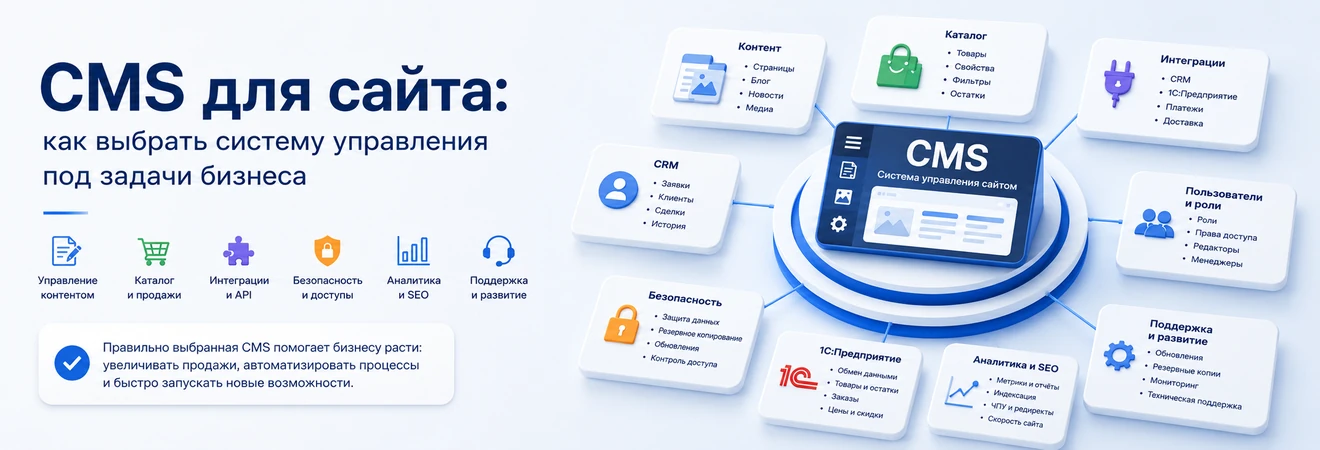
CMS is often chosen out of habit: “a previous website was already built on it,” “a contractor recommended it,” “it’s cheaper to start,” “it has a lot of modules.” This approach looks convenient before launch, but the risk appears later - when you need to develop a catalog, connect CRM, set up SEO, differentiate access, launch new landing pages or support the project without constant accidents.
The content management system should correspond not to abstract popularity, but to business processes. For a corporate website, pages, forms, a blog, cases and convenient marketing are important. For an online store - catalog, product properties, filters, orders, payment, delivery and exchange with 1C. For the portal - roles, documents, personal accounts, API and security. Therefore, choosing a CMS is an architectural decision that affects development costs, speed of change, and quality of operation.
Why CMS should not be chosen by popularity
There is no universal CMS. One system is well suited for a content site, another is convenient for an online store, a third is needed for complex corporate scenarios, and in some projects the classic CMS becomes a limitation. The error begins where the platform is chosen before the site’s tasks are described.
A popular CMS can be a good solution if it covers real scenarios: the editor quickly updates the page, the marketer creates a landing page, the catalog can accommodate the required number of products, integrations work stably, developers can support the project, and the SEO specialist receives the necessary settings.
The correct question is not “which CMS is better,” but “which management system will support our website a year after launch.” It is through this question that you need to evaluate the platform, modules, architecture, cost of ownership and future support.
What tasks should the site solve after launch?
Before choosing a CMS, you need to describe the daily operation of the site. Who will publish the pages? How often will services, promotions, cases and news change? Do you need a product catalog? Will there be different roles in the admin panel? Do I need to connect CRM, 1C, warehouse, payment, delivery, analytics and mailings?
If these questions are not sorted out in advance, a CMS is chosen based on external features: a convenient demo template, a familiar admin panel, low start-up cost, a large number of modules. After the launch, it turns out that the marketer cannot put together a page without a developer, catalog filters create duplicates, enquiries do not transfer the necessary data to CRM, and any update becomes a risk.
A good CMS helps a business manage a website, and not just store content. It should support sales, marketing, SEO, analytics, integrations and maintenance. The more complex the project, the more important it is to evaluate not only the admin interface, but also the architecture.
CMS for corporate website
For a company website, the CMS should be convenient for the marketing and content team. A corporate website usually includes services, cases, industry pages, a blog, forms, vacancies, documents, pages for advertising and SEO sections. If every change requires a developer, the site quickly ceases to be a working tool.
It is important to check how convenient it is to create new pages using templates, change blocks, manage menus, add images, edit metadata, connect forms and publish materials without the risk of breaking the design. This is especially important for a B2B company: the site is often used as a point of trust before an enquiry, tender or negotiation.
A CMS for a corporate website should provide manageability. If a company has new services, markets, cases or landing pages, the team should not start mini-development every time.
CMS for online store
For an online store, choosing a CMS is more critical than for a simple website. Not only content is important here, but also commercial logic: catalog, product properties, filters, search, cards, prices, stock levels, discounts, cart, checkout, payment, delivery, statuses and notifications.
You need to understand in advance the scale of the catalog, the number of properties, the depth of categories, the logic of filters, requirements for SEO landing pages, updating prices and stock levels, communication with 1C, CRM, warehouse and payment services. If the CMS does not work well with the catalog or does not allow you to flexibly manage properties, problems will appear in filters, cards, uploads, speed and indexing.
For e-commerce, it is not enough to ask whether it is possible to “make a store” on the chosen platform. You need to check whether it can withstand seasonal promotions, mass product updates, different types of prices, warehouse stock levels, promotional codes, delivery integrations, and transfer of orders to managers.
CMS and SEO: what is important to lay down in advance
CMS does not promote the site by itself, but it should provide the technical basis for SEO. It is important that the system allows you to manage Title, Description, H1, CNC, canonical, robots.txt, sitemap.xml, redirects, meta tag templates, page indexability and loading speed.
On a corporate website this is manifested in the structure of services, landing pages, blog, cases and regional sections. In an online store - in categories, cards, filters, sortings, tags, brand pages and URL duplicates. A CMS should help manage these areas, not create technical chaos.
It is especially important to think through catalog filters in advance. Some combinations can be useful SEO landing pages, but most parameters should not turn into endless indexable URLs.
Integrations: CRM, 1C, warehouse, payments and external services
A modern website rarely works separately from other business systems. Enquiries should go into CRM, orders should go into the accounting system, prices and stock levels should be updated from the warehouse or 1C, payments should return statuses, and analytics should link the request to the traffic source. Therefore, CMSs need to be assessed based on their readiness for integrations.
A ready-made module can cover a typical scenario, but does not always fit the company’s real processes. For example, a business needs to transfer to CRM not only the name and phone number, but also the login page, UTM tags, selected product, city, customer type, comment, source of contact and status.
If the CMS is poorly extensible or depends on unstable modules, integrations become a weak point. Data may be delayed, duplicated, lost, or require manual verification.
Roles, access credentials and security
CMS is not only pages and modules, but also access credentials. The administrative panel can be used by the owner, marketer, editor, manager, SEO specialist, developer, contractor and support service. If you give everyone full access, the risk of accidental errors, data deletion, and changes to critical settings increases.
When choosing a CMS, you need to look at how it organizes roles, rights, change history, user management, login security and restrictions for different teams. For a simple site, a basic delineation is sufficient. For a portal, online store or project with personal accounts, access rights become part of the architecture.
It is also important to consider updates, vulnerabilities, third-party modules, backups, and activity monitoring. Even a convenient CMS can become a source of problems if it is not updated or uses outdated extensions.
Post-launch support and updates
CMS must be selected taking into account the cost of ownership. The starting price of a license, template or development is only part of the cost. After launching, the site needs to be updated, modules checked, errors corrected, structure developed, speed optimized, new services connected, and security maintained.
If it’s hard to find developers for a CMS, the documentation is weak, modules conflict with each other, and every update requires an emergency fix, a cheap start quickly becomes an expensive operation. This is especially noticeable on projects that are actively developing.
Before choosing a platform, it is worth assessing who will maintain the site in 6–12 months. Is it safe to update the system? Is there a clear architecture? Are non-standard development changes documented? Is it possible to quickly find the cause of the error?
CMS, framework, no-code or headless: what to choose
No-code and constructors are suitable for quickly launching simple pages, testing hypotheses and small projects where speed of start is important. Limitations arise with complex structures, non-standard integrations, performance requirements, and scaling.
Classic CMS is well suited for sites where the main task is to manage content, pages, forms, blog, services and standard sections. E-commerce CMS is needed where there is a catalog, orders, payment, delivery, stock levels and integrations.
Framework or custom development are appropriate when the business logic is more complex than a typical website: personal accounts, B2B portals, service interfaces, non-standard roles and complex work with data. A headless approach should be considered if content needs to be sent to different interfaces: a website, an application, a portal, or several frontend layers.
How to choose a CMS for the type of project
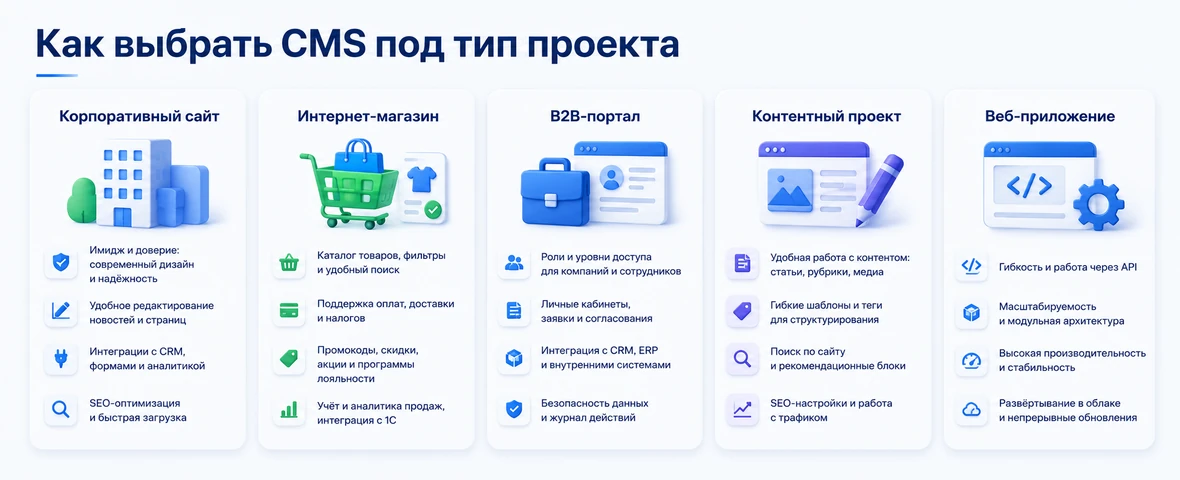
Choosing a CMS is easier if you evaluate not the names of the platforms, but the type of project and future restrictions. For one site, the speed of publishing content is important, for another - the catalog and warehouse, for a third - user roles, documents and APIs.
| Project type | What is important in a CMS | What to check before choosing | Risk of wrong choice |
|---|---|---|---|
| Corporate website | Pages, blog, forms, SEO, editor roles | Ease of administration, page templates, SEO settings | Marketing depends on the developer and is slow to launch new pages |
| Online store | Catalog, properties, filters, orders, payment, delivery | Catalog scale, integration with 1C and CRM, speed, balance exchange | The store is difficult to develop, maintain and promote |
| B2B portal | Roles, documents, personal prices, enquiries, access credentials | User rights, API, personal accounts, security | The system does not withstand real sales and service processes |
| Content project | Categories, authors, media, publications, SEO, moderation | Editorial scripts, material templates, publication speed | Content is difficult to release regularly and maintain in order |
| Service or web application | User scripts, data, frontend, API | Do you need a CMS at all or is it better to have a custom/backend architecture? | CMS limits product logic and increases the cost of improvements |
Errors when choosing a CMS
The first common mistake is to choose a CMS only because it is familiar to the contractor. This is convenient for the development team, but not always suitable for the business. If the platform does not match the catalog, integrations, SEO structure or user roles, the project will suffer from compromises.
The second mistake is to look only at the starting cost. A cheap system can be expensive to maintain if a developer is needed for every edit, modules are poorly compatible, and integrations have to be done in workarounds. It is important to consider not only the launch, but also support, development, updates and improvements.
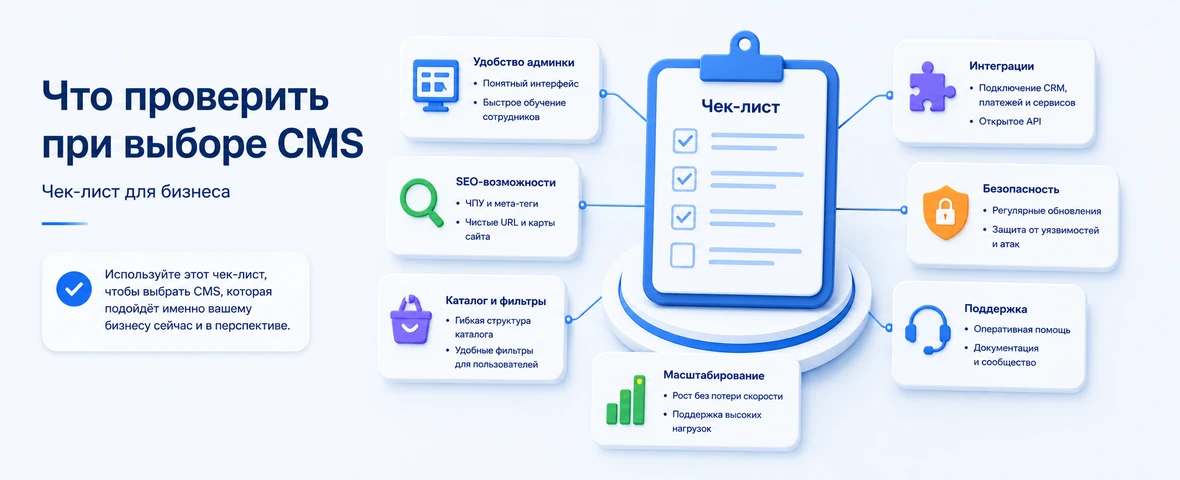
The third mistake is not checking the usability of the admin panel for real users. Before choosing, you should go through typical scenarios: create a page, change a product card, add an image, set up meta tags, publish material, check the form.
The fourth mistake is to forget about integration. If the site must work with CRM, 1C, warehouse, payment, delivery, analytics or personal accounts, this must be taken into account before choosing a CMS.
How DevAstro helps you choose a CMS for a project
DevAstro considers the choice of CMS as part of the site design, and not as a separate technical dispute. First you need to understand the business objectives: what kind of website is needed, who will manage it, what sections will be developed, is there a catalog, what data needs to be transferred, what SEO requirements are important and how the project will be supported after launch.
For corporate projects, DevAstro helps you choose the architecture for website development: pages, content, forms, roles, SEO and future improvements. For stores, the catalog, product cards, filters, orders, payment, delivery and online store development scenarios are assessed separately. If the project is related to CRM, 1C, warehouse or external services, API integrations are designed in advance.
If a site needs personal accounts, a B2B portal, complex roles or service logic, a classic CMS may not be enough. In such cases, web enquiries and SPA, headless approach or custom architecture are considered. Once launched, the project also needs technical support for the site so that updates, security, forms, speed and integrations remain under control.
What's the result?
The best CMS is not the one that is more popular, cheaper or more familiar to the contractor. The right content management system corresponds to business objectives: it helps publish content, develop the structure, manage the catalog, connect integrations, support SEO, differentiate access and maintain the project after launch.
If the site is simple, the choice can be relatively quick. If the project is related to sales, catalogue, CRM, 1C, personal accounts, analytics or regular improvements, the CMS must be chosen along with the architecture. Otherwise, the restrictions will become visible after launch, when the site begins to receive traffic, enquiries, orders and real business tasks.
Before starting development, it is worth assessing not only how the site will look, but also how it will be used within the company. Who will fill the pages, who will be responsible for enquiries, what data will go to external systems, how SEO pages will work, who will maintain updates and how the project will develop. These questions help you choose a CMS not formally, but for real business processes.
FAQ
How should a business choose a CMS?
A CMS should be chosen by business tasks: site type, editor roles, catalog logic, integrations, SEO, security, load and maintenance cost. A simple company website and an ecommerce project require different priorities.
When is a CMS better than custom development?
A CMS is practical when the project needs typical pages, a familiar admin panel, fast launch and predictable maintenance. Custom development is stronger for unusual logic, roles, complex data, B2B workflows or product interfaces.
Which SEO features should be checked in a CMS?
The CMS should support clean URLs, titles, descriptions, H1, canonical rules, sitemap.xml, robots.txt, redirects, breadcrumbs, metadata templates, image alt text and landing page management.
Why is maintenance cost more important than license price?
A low license cost does not help if every change is difficult, the website is slow or integrations are fragile. The real cost includes development, support, updates, security and future growth.
Should a CMS be tested before procurement?
Yes. Run a small proof of concept with a real page, approval, SEO fields, roles, rollback and one integration scenario. A polished demo does not reveal daily operational limits.
How should total CMS cost be compared?
Include licensing, implementation, hosting, updates, security, integrations, editor training, support and routine change costs over several years.