
Website redesign often begins with a visual task: update the interface, make the pages more modern, improve the delivery of services. But for a working website, a new version is not only about appearance. It covers page structure, forms, URLs, SEO, analytics, speed, mobile scenarios, CRM and integrations.
If you update the design without technical preparation, the site may look better, but begin to perform business tasks worse. Enquiries stop reaching managers, old pages return 404, goals in analytics don’t work, advertising landing pages lose conversion, and search engines see a different structure instead of the usual commercial URLs.
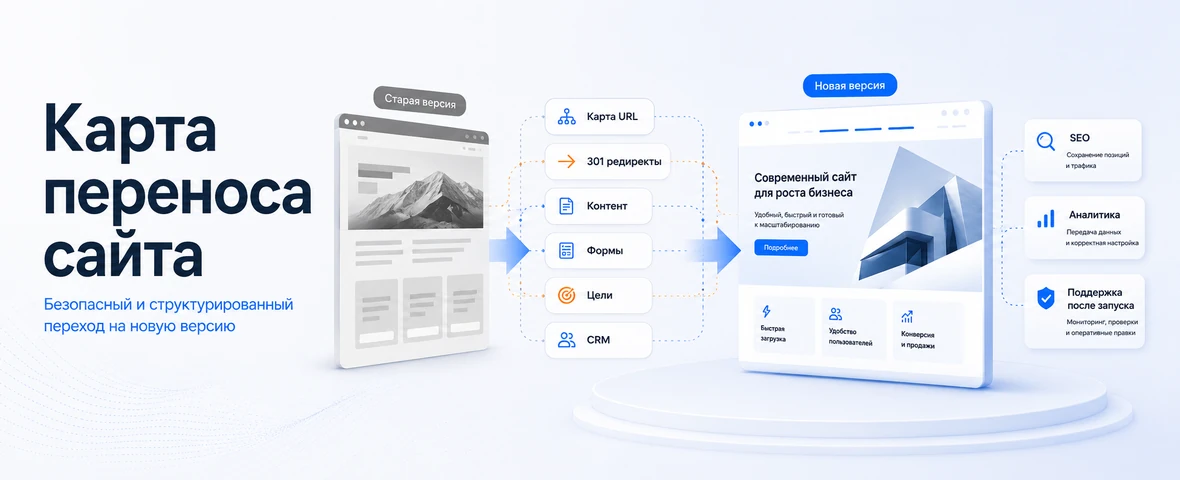
Therefore, the redesign should be considered as the launch of a new version of the site. It is important not just to draw layouts, but to transfer a working system without loss: save important pages, check forms, set up redirects, transfer metadata, test the mobile version, analytics and integrations.
Why website redesign is not just a new look
The visual part is the first to be noticed, but the consequences of the redesign most often occur in the technical and marketing layers. The new template changes the location of buttons, forms, menus, trust blocks, service cards, catalog structure, mobile scenario and loading speed. Even if the content remains similar, the user may begin to navigate the site differently.
For SEO, the risk is even wider. During the redesign, page addresses, headings, texts, meta tags, internal links, breadcrumbs, sitemap.xml, robots.txt and indexing rules may change. Search engines do not see “an updated design,” but a set of technical changes that need to be processed correctly.
What is important for business is not the fact of the new interface itself, but the preservation of working scenarios. The user must find the desired page, understand the offer, submit a request, place an order, or go to contact. If the new version interferes with these activities, the redesign becomes a source of waste.
What can be lost with an incorrect redesign
The main mistake is to evaluate a redesign only by layouts. Everything may look neat on the layout, but after publication it turns out that some pages are missing, forms are sending enquiries without UTM tags, goals are not configured, old URLs are not redirected, and the mobile version has become less convenient.
Most often, a business loses not one indicator, but a chain. If a search page leads to an error, organic traffic drops. If the form works, but the data does not go to CRM, managers do not see the request. If analytics does not record events, marketing does not understand what has changed since the release.
A separate risk is the loss of accumulated commercial pages. Many sites have sections that have been collecting traffic for years: services, categories, articles, cases, landing pages for advertising, regional or brand pages. Removing or merging them without a transfer card is dangerous.
Audit of the current website before redesign
Before designing a new version, you need to capture what already works. This is not a formality, but a basis for decisions: which pages cannot be lost, which forms generate enquiries, which URLs receive traffic, which scenarios are important for sales, which sections are used in advertising and which integrations are connected.
The minimum audit should include important URLs, pages with organic traffic, landing pages for advertising, forms, analytics events, goals, calls, CRM integrations, sitemap.xml and robots.txt, current errors, speed, mobile scripts and internal links.
If the site is already old, the audit is especially important. It may contain outdated sections, duplicates, weak texts and technical errors. But you can’t delete everything “because we’re making a new version.” For each page, a decision is needed: save, update, merge, close from indexing or redirect.
SEO during redesign: URL, redirects and structure
If the URL structure changes during a redesign, you need a migration plan. Old addresses need to be compared with new pages: one to one, to a section above, to an updated analogue, or to a relevant category. Redirecting all old pages to the main page is a bad practice: the user loses context, and the search engine does not understand where specific material has been moved.
It is better to save critical pages without changing addresses, unless there is a strong reason to change the structure. This applies to services, categories, articles with traffic, cases and advertising landing pages. If the URL changes, a correct redirect and status check are needed.
After publishing a new version, you need to check 404, redirect chains, sitemap.xml, robots.txt, canonical, internal links and the availability of important pages for indexing. Problems with SEO after a redesign often do not appear immediately, so control is needed both before the launch and after the release.
Forms and enquiries: what to check before publishing a new version
Forms are one of the most vulnerable areas during redesign. Fields, buttons, validation, antispam, notifications, pop-ups, quizzes, shopping cart, callback and sending scripts are changing. Externally, the form may work, but the enquiry will not reach CRM, the letter will go to spam, the UTM tags will be lost, and the manager will not see the source of the request.
Before starting, you need to go through all forms as a user: submit a request, check email, CRM, notifications, goals, analytics events, UTM and processing status. For an online store, the cart, order, payment, delivery, promotional codes and statuses are checked separately.
Test requests must be made not only on the desktop. It is important to test the mobile form, keyboard, input fields, phone mask, submit button, error messages and script after submission.
Analytics: why you can’t wait for a report in a month
Analytics need to be checked before the launch of a new version, and not after the first reporting period. If goals, events, forms, calls, carts, clicks, submissions and e-commerce scripts do not work from day one, the business loses release data. Then it’s difficult to understand whether the redesign improved conversion or simply broke the measurements.
It is important to verify that events are sent from new forms and buttons, phone numbers are tracked, UTM tags are saved, tickets are associated with sources, and the CRM receives the necessary fields. If there is end-to-end analytics, the new version should not break the connection between advertising, enquiry and sale.
It’s also worth comparing indicators before and after launch: traffic, form conversion, calls, speed, bounces, orders, share of mobile users and errors. Without a baseline, evaluating a redesign becomes subjective.
Mobile version and UX after redesign
New designs often look great on a wide screen, but lose quality on mobile devices. A phone user should not have to search for an order button, close intrusive pop-ups, struggle with small fields, horizontal scrolling, an inconvenient menu or a heavy product card.
On the mobile version, you need to check the first screen, menu, buttons, forms, service cards, filters, cart, phone clickability, padding, readability, speed and path to the enquiry. It is especially important to go through real scenarios: find a service, submit a form, place an order or go to a contact.
UX after redesign is judged not on aesthetics, but on the user's ability to perform an action. If the new version has become more visually impressive, but the path to the enquiry is longer, this design needs to be improved before release.
Website speed after redesign
A redesign can slow down a site, even if the old version was fast. The reasons are typical: heavy images, video on the first screen, complex animations, unnecessary libraries, poorly connected fonts, third-party widgets, unoptimized scripts and heavy filters.
Speed affects the user experience and technical base of the site. The user may not wait for the page, not open the form, not complete the order, or return to the search results. Therefore, performance should be checked before publication, and not after complaints from managers or a drop in conversion.
We cannot promise that acceleration will automatically lead to an increase in positions. It’s more correct to say this: the new version should maintain or improve the technical basis for SEO and UX, and not create additional obstacles for users and search engines.

Integrations: CRM, 1C, payment, delivery and external services
A redesign can affect integrations, even if only the pages change in appearance. A new form can send a different set of fields, a cart can change the order structure, checkout can send statuses differently, and buttons can stop sending analytics events.
If the site is connected to CRM, 1C, warehouse, payment, delivery, telephony or mailings, these connections need to be tested separately. The check should follow the full scenario: the user performs an action, the data is sent to an external system, the status is returned, the manager sees the request, analytics records the event.
You cannot limit yourself to the phrase “integration was already on the old site.” The new version may change the HTML structure, field names, handlers, URLs, events and submission conditions. Therefore, integration control must be part of the launch.
What to check before launching a new version of the site
A redesign should have a release checklist. It helps not to miss areas that are not visible in the layout, but affect enquiries, SEO, analytics and project stability.
| Test area | What to check | What happens if you miss | When to check |
|---|---|---|---|
| SEO pages | URL, Title, Description, H1, text, indexability | Traffic drop and loss of important pages | Before launch and after publication |
| Redirects | Old and new URLs, 301, no chains or errors | 404, loss of relevance, crawl errors | Before launch |
| Forms and enquiries | Sending, CRM, mail, UTM, notifications, antispam | Enquiries do not reach managers or arrive without data | Before launch and after release |
| Analytics | Goals, events, calls, forms, orders, sources | It is impossible to evaluate the result of the site update | Before launch |
| Mobile version | Menu, buttons, forms, cards, filters, speed | Users do not pass the enquiry journey | Before launch |
| Speed | Images, scripts, fonts, Core Web Vitals | Failures are increasing, UX and technical basis of SEO are deteriorating | Before launch and after release |
| Integrations | CRM, 1C, payment, delivery, API, statuses, notifications | Data is lost or arrives with errors | Before launch and after release |
| Rollback plan | Backup, access, old version, responsible | Errors are difficult to correct quickly | Before publication |
Errors during website redesign
The first mistake is to start with a visual without auditing the current site. As a result, the team may redraw pages beautifully, but not notice which URLs are generating tickets, which sections are important for SEO, which forms are related to CRM, and which events are needed by marketing.
The second mistake is changing the structure without a redirect map. It is especially dangerous to delete old pages, merge sections, and change addresses without matching. This results in 404s, lost transitions, crawl errors, and traffic drops.
The third mistake is launching a new version without checking forms and analytics. The team sees that the site has opened, but does not know whether enquiries are being received, whether goals are being recorded, whether UTMs are being saved, and whether the manager sees the request in CRM.
The fourth mistake is making a heavy design without technical optimization. Animations, videos, large images and unnecessary scripts can look impressive, but interfere with loading, especially on mobile devices.
How DevAstro helps you update your website without loss
DevAstro does not consider updating the site as a simple shell replacement. If a project needs a new version, it's first important to understand what's already working: what pages are bringing in traffic and tickets, what forms are linked to the CRM, what goals are configured, what integrations are being used, and what technical limitations the current version has.
As part of website development, DevAstro helps to rebuild the structure, interface and technical basis of the project so that the new version does not lose business scenarios. If the update affects forms, CRM, 1C, payment, delivery or external services, API integration and data transfer verification are separately worked out.
After launch, technical support of the site is important: monitoring errors, forms, speed, redirects, analytics, indexing and stability. For online stores, the catalog, filters, cards, shopping cart, orders and online store development scenarios are additionally taken into account.
What's the result?
Lossless website redesign is not only a new visual system. This is a controlled transfer of a working project to a new version: while maintaining important pages, enquiries, SEO structure, analytics, mobile scenarios, speed and integrations.
If the redesign is done only as a design task, you can end up with a beautiful website that accepts enquiries worse, measures worse, loses pages in search and creates technical problems after launch. Therefore, preparation is more important than release speed.
Before publishing a new version, you need to check the URL, redirects, meta tags, content, forms, CRM, analytics, mobile version, speed, integrations and rollback plan. Then updating the site becomes not a risk for the business, but a normal stage in the development of the project.
FAQ
Why can a redesign reduce leads?
A redesign can change URLs, forms, CTAs, block order, speed, mobile UX and analytics events. If these areas are not checked before release, the new version may look better but convert worse.
How do you preserve SEO during a redesign?
Important URLs, titles, descriptions, H1, copy, internal links, canonical tags, structured data and sitemap.xml should be transferred, and redirects should be prepared before launch. After release, indexation, 404 errors, speed and key pages need control.
Should the whole website be redesigned at once?
Not always. A safer route is to start with prototypes, a staging version or the most important landing pages, then check forms, analytics, SEO structure and conversion before rolling out wider changes.
What belongs in a redesign launch checklist?
The checklist should include backups, staging, redirects, forms, CRM, analytics goals, mobile scenarios, speed, metadata, structured data, sitemap.xml, robots.txt and post-release error monitoring.
When is the safest time to launch a redesign?
Choose a window when the team can control release and monitor forms, CRM, analytics, indexation and errors for several days. Avoid combining the migration with peak paid traffic unless the risk is planned.
Which metrics should be compared before and after launch?
Record organic traffic, key rankings, form conversion, orders, Core Web Vitals, 404 errors, analytics goals and CRM delivery. Compare equivalent templates and traffic sources.