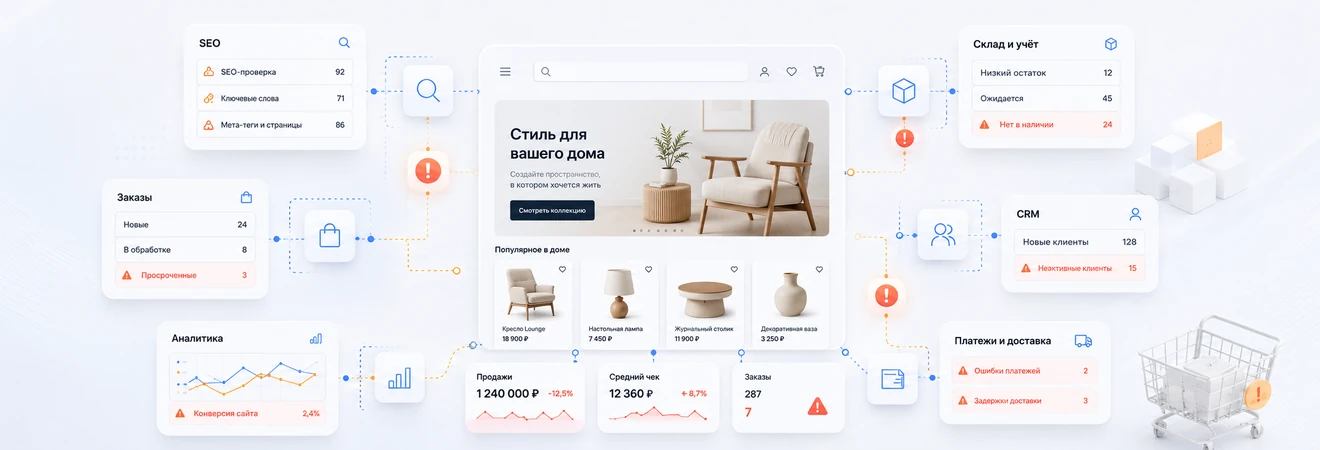
At the start, such errors may seem trivial. But once launched, they begin to directly impact sales, SEO, accounting, and operations. The store gets traffic, but doesn't convert well. Products are advertised but not in stock. The client places an order, but the manager sees it with a delay. Search engines find thousands of technical URLs instead of a clear catalog structure.
In this article, we will analyze common mistakes of online stores that are best prevented before development: from the catalog and SEO to the shopping cart, accounting, CRM, analytics and integrations.
Why online store errors appear even before development
Most of the problems arise not at the time of programming, but earlier: when the business did not describe the processes, did not prepare the catalog structure, did not determine the source of prices and stock levels, did not agree on the order path and did not decide what data should be transferred between systems.
If a project starts with just page design, the team quickly ends up with unanswered questions. How are the categories organized? Where is the main price stored? What to do with multiple warehouses? What order status should the customer see? Do I need to transfer the order to CRM, 1C or MoySklad? Which filters should be indexed?
Without these solutions, an online store turns into a storefront that has to be constantly improved after launch. It is more expensive than designing the catalog, SEO, accounting and integrations in advance.
| Error | What breaks | Business implications |
|---|---|---|
| No business logic | Store processes | Post-launch rework and manual work |
| Weak catalog | Navigation, filters and SEO | Customers do not find products, pages are poorly ranked |
| Bad filters | Indexing and URL structure | Duplicates and technical garbage appear in the search |
| No integrations | Accounting, orders, statuses | Managers transfer data manually |
| No analytics | Sales management | It is unclear where clients and money are lost |
Error 1. Making a store as a storefront, and not as an e-commerce system
An online store is not only about product pages. It should connect the catalog, prices, stock levels, cart, payment, delivery, CRM, warehouse, analytics and customer support. If you design it as a regular website with cards, after launch you will have problems with the operational part.
For example, the client placed an order. What should happen next? The order must go to the manager, go to the CRM or accounting system, reserve the product, receive the payment status, transfer the data to delivery and return a clear notification to the client. If this chain is not described in advance, the store will sell formally, but the business process will remain manual.
A good online store is designed as a system. It has a data source, update rules, error scenarios, employee roles and a clear order path from the product card to shipment.
Error 2. Not thinking through the catalog structure
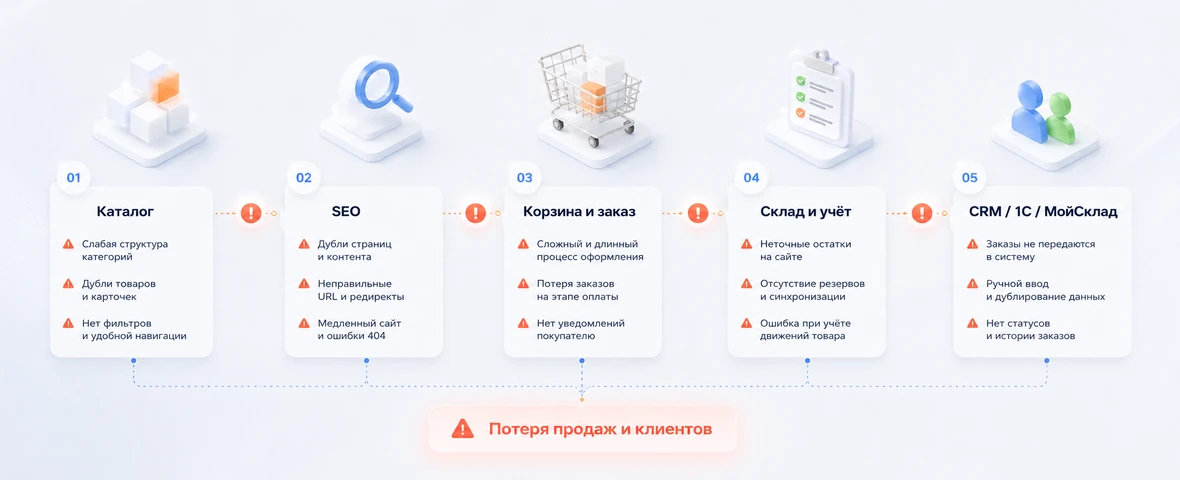
The catalog is one of the most expensive blocks to fix. If categories, properties, filters and sales offers are not designed correctly, problems affect several areas at once: navigation, SEO, product cards, integrations and inventory control.
A common mistake is to transfer the internal product catalog to the website without customizing it for the buyer. In 1C or MoySklad, the product catalog may be convenient for the accounting department and warehouse, but not for the client. On the site, categories and properties should help you choose a product, compare options and quickly move on to purchase.
| Catalog element | Typical error | Risk |
|---|---|---|
| Categories | Internal logic instead of user logic | It is difficult for the client to find the right product |
| Properties | Chaotic characteristics and different value formats | Filters do not work well or do not work at all |
| SKU | Product variants are not linked | Errors in prices, stocks and product variants |
| Images | No preparation and optimization rules | Slow loading and weak product card |
| Descriptions | Duplicates, empty texts or technical names | Weak SEO and low conversion |
Before development, you need to determine which properties will become filters, what characteristics are needed in the card, how names are formed, how product variants are structured and what data comes from the accounting system.
Error 3. Laying SEO problems in filters and URLs
In an online store, SEO breaks down not only because of weak texts. The main problems often appear in the technical structure: duplicate categories, endless URL filters, incorrect canonicals, chaotic pagination, identical title and description, lack of clear indexing logic.
Filters are especially dangerous. They can create useful landing pages if the combinations match the actual demand. But they can also generate thousands of technical URLs that erode the index and make it difficult for search engines to understand the site's structure.
Before starting, you need to determine:
- which categories should be open for indexing;
- what filters can become SEO pages;
- what parameters need to be closed from indexing;
- how CNC addresses are formed;
- how canonical, sitemap and robots.txt work;
- how deleted products and empty categories are processed.
If these rules are not built into the architecture, post-launch SEO fixes may require reworking of the catalog, templates, URLs, and filter logic.
Error 4. Complicate the cart and checkout
Cart and checkout directly affect conversion. Even a good catalog and strong traffic will not save the store if it is difficult for the client to complete a purchase, the delivery is unclear, the total amount is not displayed, or the form requires unnecessary data.
Checkout errors often look small, but each of them reduces the likelihood of a purchase: mandatory registration, unnecessary fields, unclear delivery methods, lack of quick payments, weak notifications, non-obvious form errors, poor performance on mobile devices.
For B2B stores, the scenario may be different. Legal entities, negotiated prices, repeat orders, invoices, documents, user roles and order approval by the manager are important there. If all this is not taken into account, the store will be inconvenient for the key audience.
Error 5. Not linking prices and stock levels to the accounting system
One of the most painful mistakes is launching a store without a normal connection with the accounting system. If prices and stock levels are updated manually, a business quickly experiences discrepancies: there is a product on the website, but it is not in stock; in advertising there is one price, in accounting another; the client places an order, and the manager is forced to call and explain that the position is unavailable.
For an online store, it is important to determine in advance which system is the main source of data. In some projects this is 1C, in others it is MoySklad, CRM, ERP or the administrative panel of the site. The main thing is to prevent a situation where the same data is edited in several places without rules.
| Zone | Error | Consequence |
|---|---|---|
| Prices | No single source | Different prices on the website, in CRM and in accounting |
| Stock levels | Warehouses and reserves are not taken into account | Sales of missing products |
| Orders | Not transferred to CRM, 1C or MoySklad | Managers manually transfer data |
| Statuses | Not returned to the client | The buyer does not understand what is happening with the order |
| Exchange errors | No logs or notifications | Failures remain invisible |
Integration should take into account not only the fact of data transfer, but also the frequency of updates, error handling, retries, status maps and employee responsibilities.
Error 6. Do not describe the order path after checkout
For the client, the order ends with the “Place order” button. For business it is just beginning. After placing the order, it must be processed: enter the CRM or accounting system, receive payment status, reserve the product, be sent to delivery, update the status in your customer portal and generate notifications.
If the order path is not described in advance, managers begin to work manually: check the payment, copy the order contents, clarify stock levels, change statuses in several systems and answer customers by phone.
Before development you need to fix:
- where the order goes after registration;
- what data is transmitted to the manager;
- what statuses the client sees;
- how order cancellations and changes are processed;
- how delivery and payment are transferred;
- who is responsible for transmission errors.
Error 7. Do not configure analytics and events
Without analytics, an online store is managed based on sensations. The owner sees the final sales, but does not understand where exactly customers are lost: in the category, product card, cart, delivery selection, payment, or after submitting the form.
For an e-commerce project, it is important to set up events: viewing a product, adding to cart, starting to place an order, selecting delivery, payment, successful order, form errors and refusal at critical stages. This data is needed not only by the marketer, but also by the development team to find weak points in the interface and business process.
If you leave analytics for later, after the launch it will be difficult to understand whether improvements work, which categories bring in money, where conversion is lost and which advertising campaigns bring high-quality orders.
Error 8. Leaving performance and support “for later”
The speed of an online store affects sales, SEO, and advertising traffic. Performance problems usually arise from heavy images, suboptimal filters, weak caching, overloaded pages, a large number of scripts, and hosting that is not suitable for the load.
Support should also be part of the project. After the launch, new products, promotions, integrations, delivery changes, SEO tasks, CMS updates, bug fixes and improvements for real user scenarios will appear.
If support is not provided, the store quickly begins to become outdated: exchange errors appear, pages slow down, data is inconsistent, and improvements are delayed until the problem is already affecting sales.
What to check before launching an online store
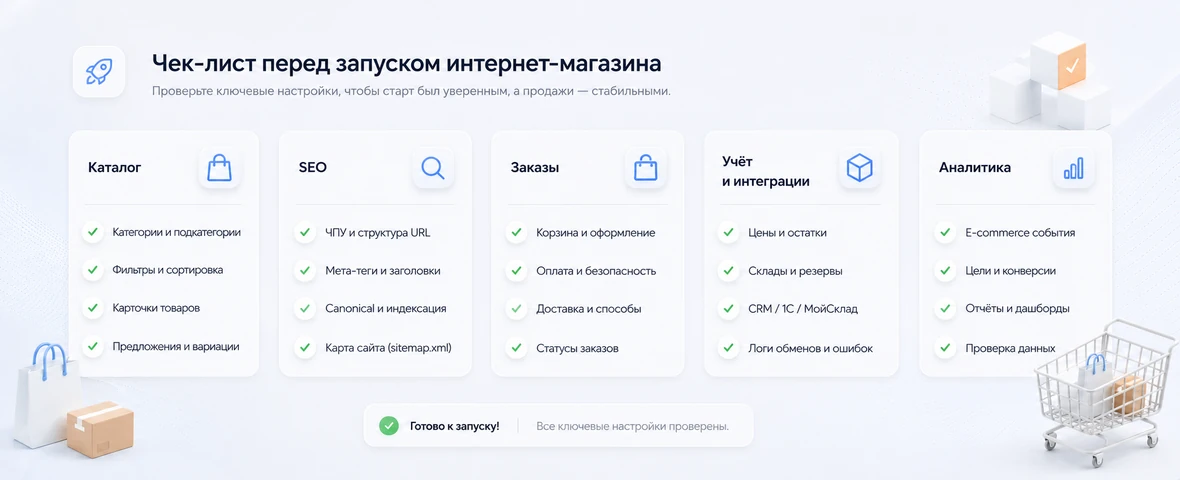
Before release, it is important to check not only the appearance of the pages, but also the operation of the entire system: catalog, SEO, orders, accounting, integrations, analytics and error scenarios.
| Block | What to check |
|---|---|
| Catalog | Categories, properties, filters, product variants, product cards |
| SEO | CNC, title, description, H1, canonical, sitemap, robots, filter indexing |
| Orders | Cart, checkout, notifications, statuses, cancellations, order changes |
| Accounting | Prices, stock levels, warehouses, reserves, data source |
| Integrations | CRM, 1C, MoySklad, payment, delivery, exchange errors and logs |
| Analytics | Events, goals, ecommerce data, conversions and critical stages of the funnel |
Output
Errors when developing an online store are most often associated not with a separate page, but with the architecture of the project. If you don’t think through the catalog, SEO, inventory, prices, order path, CRM, accounting and analytics, the store may look ready, but sell poorly and create manual work for the team.
Correct development begins with the design of processes: where goods come from, where prices are stored, how stock levels are updated, where orders go, what statuses the client sees and how the business understands the effectiveness of sales.
DevAstro develops online stores as e-commerce systems: with a well-thought-out catalog, SEO preparation, integrations, analytics, personal accounts and a connection with CRM, 1C, MoySklad, payment and delivery.
If you need to design or modify an online store without chaos in the catalogue, SEO and accounting, look at the online store development service. To connect a website with CRM, 1C, MoySklad, payment or delivery, API integrations are also suitable.
FAQ
Which ecommerce development mistakes hurt sales most?
Weak catalog structure, poor filters, long checkout, unclear delivery, broken forms, slow pages, wrong stock data and missing analytics usually damage sales first.
Why should SEO be designed with the catalog?
The catalog defines future landing pages, filters, URLs, breadcrumbs, titles, H1 and internal links. If SEO is added after development, part of the structure often needs rework.
What should be checked before store launch?
Catalog, product cards, cart, payment, delivery, notifications, order statuses, mobile UX, speed, analytics goals, SEO metadata and CRM or ERP exchange should be tested.
Can these mistakes be fixed after launch?
Yes, but some are more expensive to fix on a live store. It is better to audit the store and first close issues that affect orders, indexation, accounting and customer trust.
What should be tested beyond the normal purchase path?
Test payment timeout, duplicate submission, stock changing during checkout, unavailable delivery, returning from the payment provider and order import failure. The customer must understand what happened without being charged twice.
How do you know the store is ready for traffic?
Run end-to-end scenarios from an SEO landing page to payment, CRM or ERP import and customer notification. Confirm analytics, monitoring, manager workflows and rollback actions before increasing traffic.