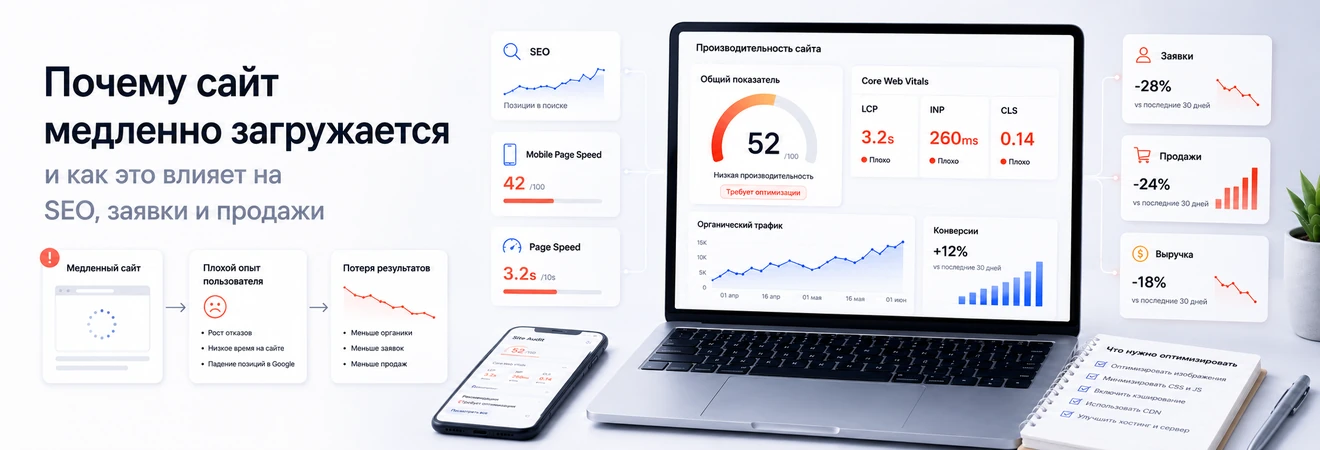
Slow website loading rarely starts with one reason. Sometimes the problem is in heavy images, sometimes in CMS templates, third-party scripts, weak server, catalog, filters, integration with 1C or suboptimal data processing logic. For the user, everything looks the same: the page takes a long time to open, the buttons respond with a delay, the form does not have time to submit, the product card loads slower than he is willing to wait.
For business, site speed is not a technical whim or a race for an abstract PageSpeed score. This is part of the user experience, SEO base, advertising effectiveness and conversion. If pages are slow, a site may receive traffic but lose leads, orders, and trust before the user even sees the main offer.
Why site speed cannot be assessed only by PageSpeed
PageSpeed Insights is useful as a diagnostic tool, but its score should not be the only criterion for a site's quality. The service shows technical signals, laboratory data and recommendations, but for business, the real scenario is more important: the user opened the page, understood the offer, clicked a button, submitted a form, selected a product or placed an order.
The same page works differently for a user with fast Internet on a new laptop and for a client who opened the site from a phone on the road. Therefore, when analyzing, you need to look not only at a test check, but also at real data: devices, browsers, regions, page types, traffic sources and visitor behavior.
The correct task is not “get 100 points”, but “find technical reasons that interfere with the target action.” For a corporate website this is an enquiry. For an online store - viewing the catalog, adding goods to the cart and placing an order. For a B2B portal - authorization, documents, statuses and customer portal.
How loading speed affects SEO
Speed refers to the quality of the user experience. It is important for search engines that the page is accessible, understandable, stable and convenient. But it is incorrect to promise that acceleration in itself guarantees an increase in rankings: SEO depends on intent, content, structure, internal linking, technical accessibility and commercial factors.
Speed is especially important in competitive areas where several sites have comparable products, services or materials. If one site displays the main content faster, does not break the interface when loading and allows you to quickly complete an action, it receives a more stable technical basis for promotion.
It’s not just long loading seconds that are dangerous for SEO. Pages that formally open but remain inconvenient are dangerous: the main content appears late, elements are shifted, buttons respond with a delay, catalog filters freeze, and the mobile version requires unnecessary actions.
How a slow website affects orders and sales
The user does not rate the site as a developer. It doesn't think about the server, JavaScript, caching or database. He sees the result: the page takes a long time to open, the form appears late, the submit button freezes, the catalog responds with a delay, the cart loads unstable.
On a corporate website, slow loading most often affects enquiries. The visitor came from a search or advertisement and wants to quickly understand whether the company is suitable and leave a request. If the first screen appears slowly, the user doesn't get to the offer. If the form is delayed, he may decide that the enquiry was not submitted.
In an online store, the consequences are more noticeable. A slow catalog makes it difficult to choose. A slow product card makes comparison difficult. A slow cart makes it difficult to complete your purchase. Slow search forces the user to return to the search engine or marketplace. Even a good assortment cannot compensate for a weak purchasing scenario.
What most often slows down a website
The reasons for slow loading need to be looked for in layers. The first layer is content: images, videos, fonts, banners, icons and visual blocks. If heavy files are loaded onto the page without optimization, the user is not waiting for the meaning of the page, but for extra megabytes.
The second layer is the frontend: extra JavaScript, heavy CSS files, third-party widgets, advertising pixels, analytical tags and unsuccessful loading logic. The page may be visible, but not yet ready for interaction: there is a button, but you cannot click on it normally.
The third layer is CMS, templates, server, database and caching. On sites that have been developed for a long time without systemic control, templates accumulate extra code, outdated components and duplicate logic. If the page is reassembled each time, makes many requests and access credentials external services, drawdowns become noticeable as traffic increases.
Separate layer - integration. CRM, 1C, warehouse systems, payment services, delivery services, marketplaces and external APIs can slow down the site if data exchange is built into the user script inaccurately.
Why online stores slow down more often than corporate sites
A corporate website usually consists of a limited set of pages: services, about the company, cases, blog, contacts. An online store is more complex: catalogue, categories, filters, sorting, cards, stock levels, prices, shopping cart, ordering, customer portal, search, recommendations and data exchange with external systems.
Each of these elements affects speed. The category should quickly show a list of products. The filter must process the properties without overloading. The card must load images, features, price, availability and shipping options. The shopping cart must correctly recalculate the order, and the checkout must transfer the data to the CRM, accounting system or payment service.
On sites based on 1C-Bitrix and other CMS, the problem is often related not to the platform itself, but to the implementation of the catalog, templates and data exchange. If product properties are not structured, filters are built without taking into account the load, images arrive through data import without preparation, and stock levels are updated through heavy operations, the site slows down precisely on commercially important pages.

Core Web Vitals in simple terms: LCP, INP and CLS
Core Web Vitals help evaluate not abstract speed, but the key user sensations. They can be explained through three questions: when the user sees the main thing, how quickly the site responds, and whether the interface jumps when loading.
LCP indicates when the main visible content of a page is loaded. On a service page this could be the main block with an offer, in a catalog - a list of products, in an article - the title and first screen. If the LCP is high, the user is waiting too long for the meaning of the page.
INP evaluates the page's responsiveness to user actions: click, enter, select a filter, or submit a form. CLS is responsible for visual stability: whether blocks, images, banners and buttons move during loading. For a site with forms, a shopping cart, and product cards, these metrics are directly related to the usability of the script.
What can be optimized quickly and what requires development
Not every speed problem requires complex development. Some tasks can be solved at the content and administration level: replace heavy images, remove unnecessary banners, check videos, reduce decorative blocks, disable unused widgets, bring files to the required size.
But if the site is slow due to templates, CMS components, database queries, caching, third-party scripts or integrations, superficial edits will not solve the problem. You can temporarily reduce the weight of the page, but with the next development change or update of the catalog, the slowdown will return.
A developer is needed when the problem is in the architecture of the page: how the template is assembled, what data is pulled up, when scripts are executed, how the cache works, what requests go to the database, what APIs are called at the time of loading and what data ends up on the page unnecessarily.
Why the site may slow down after improvements and integrations
A common situation: the site worked acceptably, then new forms, CRM, online chat, analytics, integration with 1C, a delivery module, a review widget, personal recommendations or additional filters were added to it. Visually the changes are small, but technically the page becomes heavier.
The problem is not the fact of integration itself. CRM, 1C, warehouse, payment services and marketing tools are needed by business. The risk arises when external services are connected without assessing the impact on speed and user scenario. If a page waits for a response from an external API before displaying an important block, the user waits along with it.
After each major modification, you need to check not only the appearance, but also the performance. Added a new module - check loading of key pages. Connected the widget - check interactivity. The catalog has been changed - check the categories and filters. We set up an exchange with 1C - check cards, stock levels, prices and load during update periods.
What slows down a website and how it affects business
To avoid reducing optimization to general recommendations, it is useful to relate the technical cause to a specific business impact. Then it is clear who should participate in the correction and why the problem cannot be postponed.
| What slows down | How it manifests itself | How it affects business | Who should fix |
|---|---|---|---|
| Heavy images | The page takes a long time to open on mobile devices | The user does not wait for the product, service or enquiry form | Content manager and developer |
| Third party scripts | The page is visible, but does not respond well to actions | Forms, buttons, filters and cart work with a delay | Developer and marketer |
| Complex catalog | Categories, filters and sorting open slowly | The user cannot quickly select a product and goes to a competitor | Developer and e-commerce manager |
| Suboptimal queries to the database | The site sags when traffic increases or data is updated | Instability, errors and loss of orders appear during peak periods | Backend developer |
| Bad caching | Repeated calls each time create extra load | Response time increases, and support is forced to extinguish symptoms | Developer or system administrator |
| Integration errors | Prices, stock levels, statuses or orders are updated slowly | The buyer sees outdated data, and managers get more manual work | Integrator and developer |
| Heavy CMS templates | All pages receive extra code and unused blocks | It's harder to improve performance, SEO and user experience | Frontend and backend developer |
| Extra advertising tags | The page becomes interactive with a delay | Paid traffic converts worse into enquiries and orders | Marketer and developer |
How to check speed before SEO promotion and advertising
Before launching SEO promotion or advertising campaign, you need to check not the entire site equally, but the key pages that receive traffic and participate in conversion. For a corporate website this is the home page, service pages, cases, contacts and forms. For an online store - categories, product cards, filters, search, cart and checkout.
The review must include technical tools and a manual script. First - PageSpeed Insights, Search Console, reports on real users, page loading analytics, server logs if necessary. Then open the page from your mobile phone, follow the user path, submit the form, apply a filter, add the product to the cart and check the order.
It is important to look not only at the main page. A user from an advertisement or search can go straight to a category, product card, article, service page or landing page. If these are the pages that are slowing down, the overall rating of the main page will not save the conversion.
When speed optimization requires technical support
If the speed problem repeats after each development change, it means that the site does not need a one-time edit, but technical support. The developer must understand the project architecture, CMS, templates, integrations, change history, and commercially important scenarios.
Technical support is needed when the site is regularly updated, connects new services, expands the catalog, changes the structure, launches advertising, develops a customer portal or exchanges data with CRM, 1C and warehouse systems. The more such processes there are, the higher the risk that new features will gradually slow down the project.
What is ultimately important for business
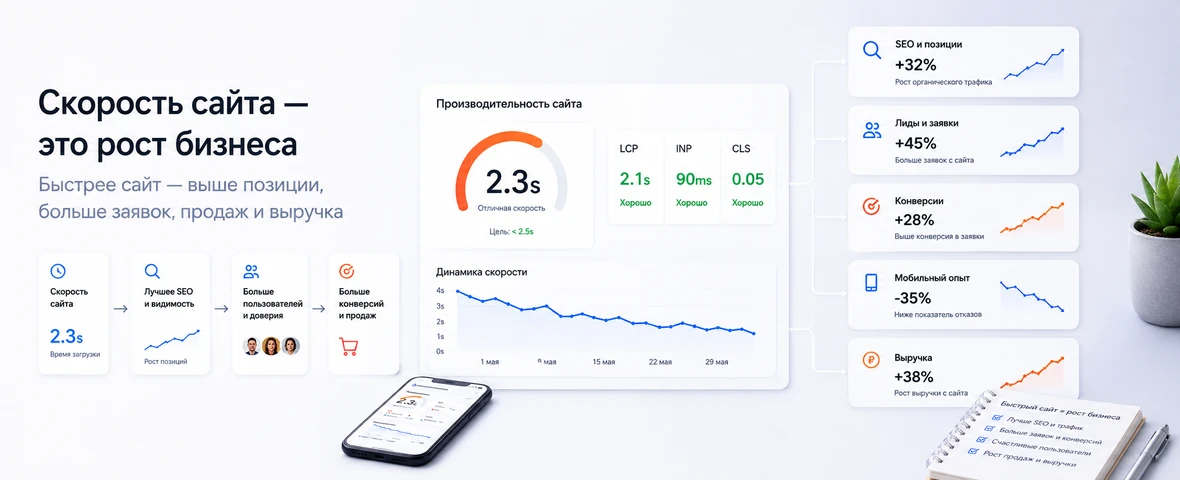
A slow website is not a separate technical malfunction, but a signal that the project needs to check the content, templates, server, database, CMS, third-party scripts, catalog and integrations. Sometimes it is enough to optimize images and remove unnecessary blocks. Sometimes it requires deep work with architecture, caching, components and communication.
For SEO, speed is important as part of the user experience and technical accessibility of pages. For enquiries - as a condition for the normal operation of forms and interface. For sales - as a factor that influences the catalog, cards, cart and ordering. For advertising - as budget protection from transitions that do not have time to turn into actions.
If the site is already slow, DevAstro can connect to the site's technical support, conduct a performance audit, and find bottlenecks in templates, CMS, catalog and integrations. For projects at the development stage, website development, online store development and API integration are also important so that speed does not deteriorate after new functions, data exchanges and improvements.
FAQ
How does website speed affect leads?
A slow website increases exits, especially on mobile traffic. Users do not wait for the first screen, form or product card, so the business loses part of demand before contact happens.
Which performance metrics matter for SEO?
Core Web Vitals matter: LCP, INP and CLS, along with image weight, fonts, JavaScript, server response, caching and layout stability. Real templates should be checked, not only the homepage.
Why can a redesign make a website slower?
Redesign often adds heavy images, extra scripts, animations, widgets, unused CSS and unstable rendering. Visual improvement without technical optimization can damage performance.
Where should speed optimization start?
Start with pages that receive traffic and leads. Check the LCP element, images, fonts, JavaScript, third-party scripts and mobile rendering, then fix what affects key scenarios first.
Is PageSpeed Insights enough for a performance review?
No. Lab tests help diagnose causes, but decisions should include field data, real devices and several commercial templates, not only the homepage.
How can performance be protected after optimization?
Set budgets for media, JavaScript and fonts, test key templates before release and monitor field Core Web Vitals. Every third-party script should have an owner and measured purpose.